Simplify Document Approval Processes with EasyDocMgt Workflow Management

ML GLOBTECH
Jun 8, 2026
Transform Static Documents into Dynamic Business Processes
Managing documents is more than simply storing files. Organisations often require documents to pass through multiple review, approval, verification, and signature stages before they become officially approved or released.
EasyDocMgt provides a powerful and flexible Workflow Management System that allows organisations to automate document-driven business processes while maintaining complete visibility, accountability, and compliance.
With EasyDocMgt, administrators can create reusable workflows that can be applied to any document, ensuring every document follows the correct approval path from start to finish.
Why Workflow Management Matters
Many organizations still rely on email chains, spreadsheets, and manual follow-ups to track document approvals. This often leads to:
Delayed approvals
Missed deadlines
Lack of accountability
Difficulty tracking document status
Compliance risks
Version control issues
EasyDocMgt solves these challenges by providing a configurable workflow engine that automates document routing, notifications, approvals, signatures, and status updates.
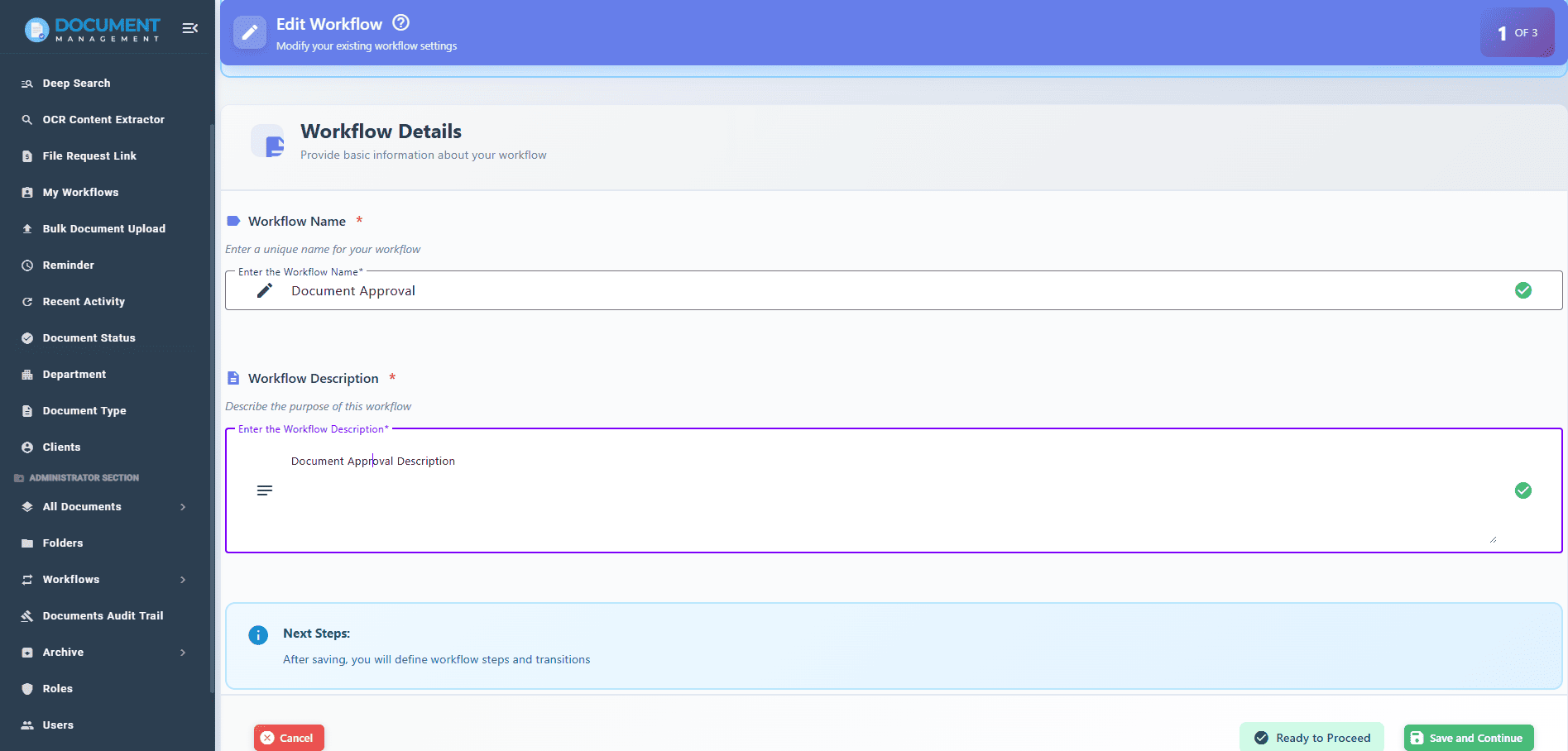
Step 1: Create Workflow Information
The first step in configuring a workflow is defining the workflow metadata.
Administrators simply enter:
Workflow Name
A meaningful name that identifies the business process.
Examples:
Document Approval Workflow
SOP Review Process
Contract Approval Workflow
Vendor Document Verification
Workflow Description
A detailed description explaining the purpose of the workflow and how it should be used.
This information helps users understand the workflow before assigning it to documents.
Step 2: Define Workflow Steps
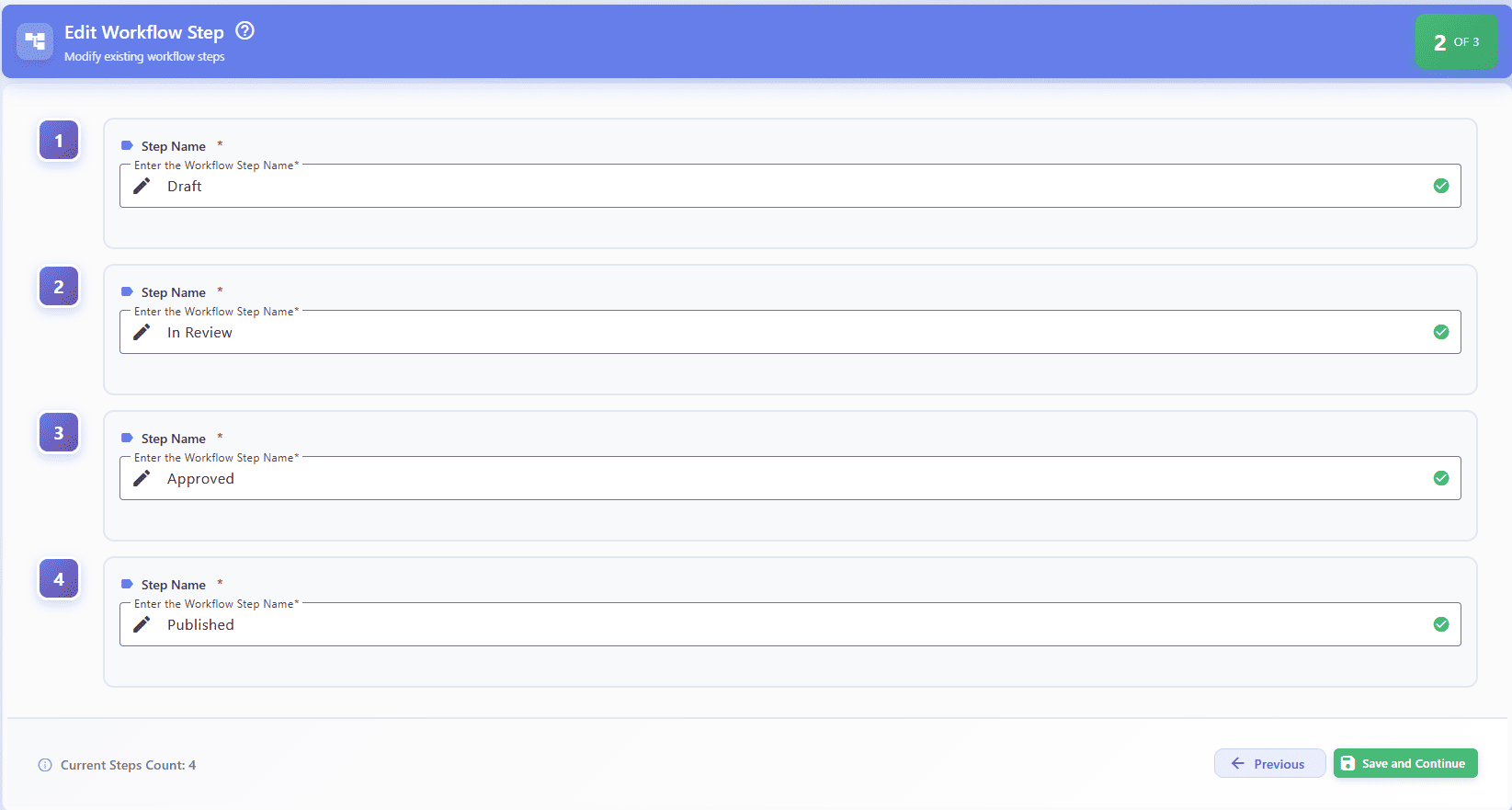
After creating the workflow, the next step is defining the stages through which documents will pass.
Examples of workflow steps:
Draft
Review
Verification
Approval
Released
Each step represents a specific stage in the document lifecycle.
Automatic Document Status Updates
One of the most powerful features of EasyDocMgt is the ability to bind workflow steps directly to document statuses.
For example:
Workflow Step —>Document Status
Draft —> Draft
Review —> Under Review
Verification —> Verification Pending
Approval —> Approved
Released —> Released
When a workflow transition is completed and the document moves to the next step, EasyDocMgt automatically updates the document status.
This eliminates manual status updates and ensures users always know the current state of a document.
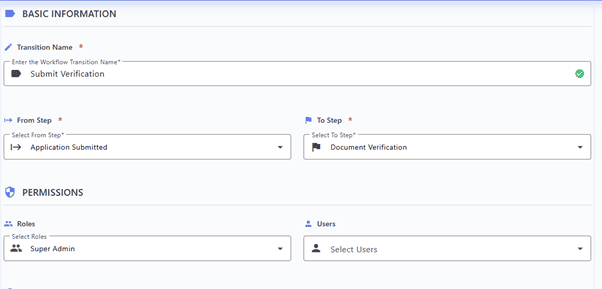
Step 3: Configure Workflow Transitions
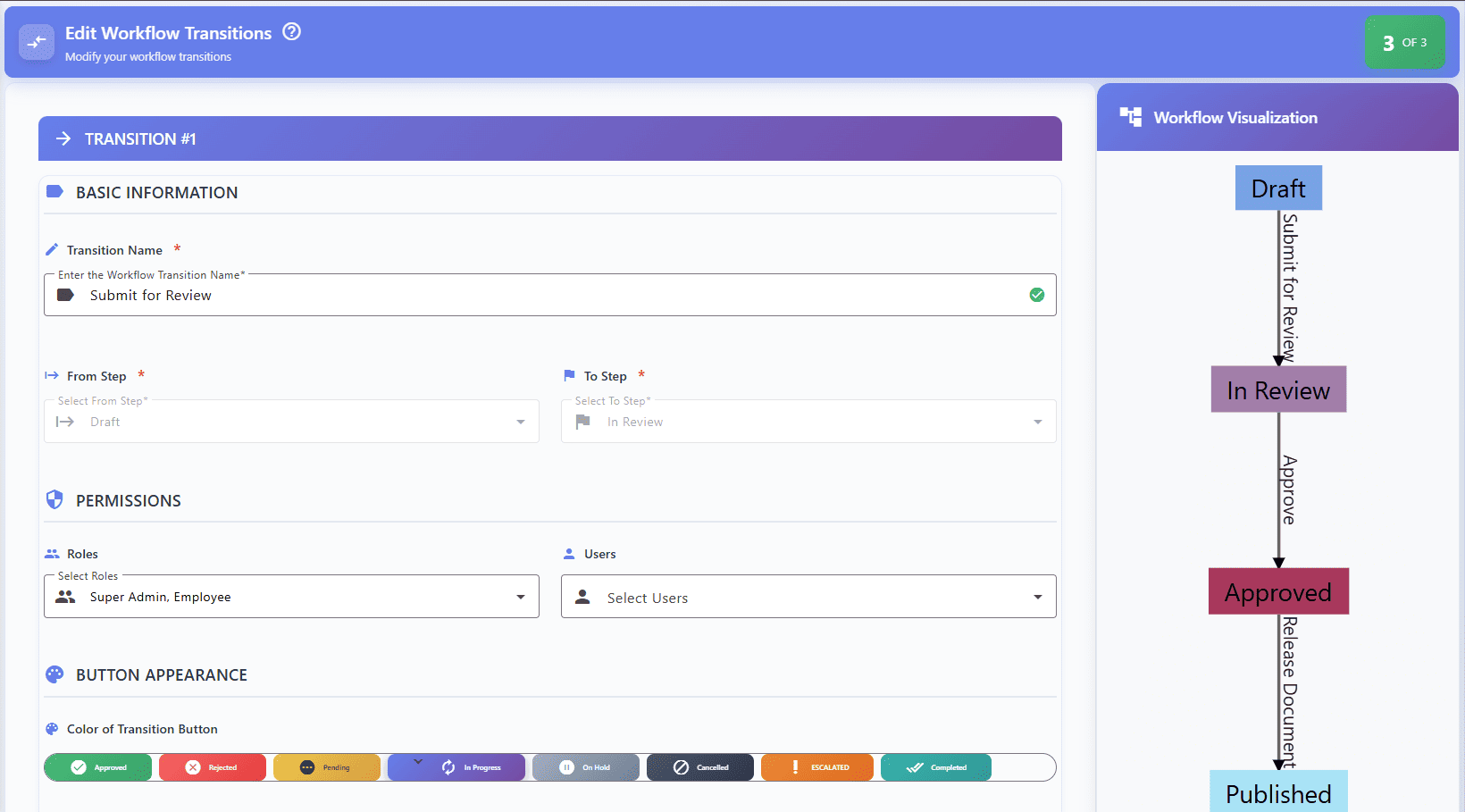
Once the workflow steps are created, administrators define the transitions that move documents from one step to another.
A transition represents an action performed by a user.
Examples:
Submit for Review
Approve
Reject
Send Back for Revision
Verify
Release Document
For every transition, administrators can configure:
Transition Name
The action users will perform.
Examples:
Submit
Review Complete
Approve
Reject
Verify
From Step
The current workflow stage.
Example:
Draft
To Step
The destination workflow stage.
Example:
Review
Assign Users or Roles to Transitions
EasyDocMgt allows complete control over who can perform workflow actions.
Transitions can be assigned to:
Individual Users
Specific employees responsible for a task.
Examples:
Quality Manager
Department Head
Compliance Officer
User Roles
Role-based assignments provide greater flexibility.
Examples:
Reviewer
Approver
QA Team
Management
Only authorized users can perform the transition.
This ensures security and accountability throughout the workflow process.
Automatic Reminders and Escalations
One of the most common workflow challenges is delayed approvals.
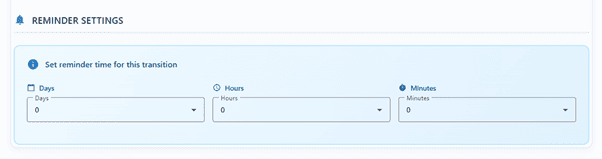
EasyDocMgt addresses this by providing configurable reminders.
Administrators can define:
Reminder duration
Notification recipients
Email alerts
System notifications
Example:
If a document remains in the "Review" stage for more than 3 days after initiation:
Automatic email notification is sent.
System notification is generated.
Assigned users or roles are reminded to take action.
This helps organizations avoid bottlenecks and maintain process efficiency.
Mandatory Document Version Upload
Some workflow processes require users to upload revised versions of documents before proceeding.
EasyDocMgt provides a simple option:
✓ Require New Document Version
When enabled:
Users cannot complete the transition without uploading a new version.
Full version history is maintained.
Previous versions remain available for auditing.
This feature is ideal for:
SOP revisions
Policy updates
Contract modifications
Technical document reviews
Mandatory Electronic Signature
For compliance-driven organizations, approvals often require signatures.
EasyDocMgt allows administrators to configure:
✓ Require Signature During Transition
When enabled:
Users must provide a digital signature.
Signature is automatically applied to the document.
Signature activity is recorded in audit logs.
Benefits include:
Regulatory compliance
Approval traceability
Reduced paperwork
Faster approval cycles

Workflow Configuration Complete
Once workflow information, steps, and transitions are configured, the workflow is ready for use.
The workflow can now be applied to documents across the organization.
Starting a Workflow on Documents
EasyDocMgt provides multiple ways to initiate workflows.
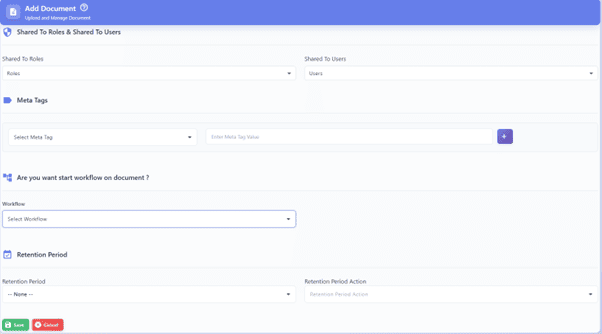
During Document Upload
When uploading a document, users can select a workflow from the workflow dropdown.
The workflow starts immediately after document creation.
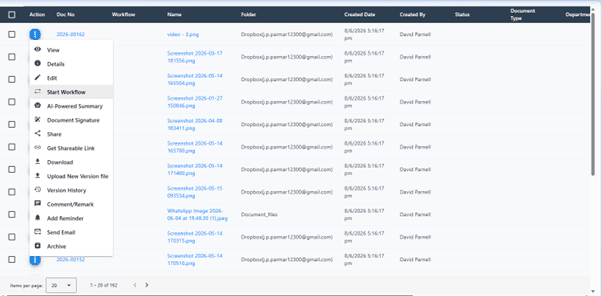
From the Document List
Workflows can also be initiated on existing documents.
Users simply:
Open the document list.
Select a document.
Click "Start Workflow".
Choose the desired workflow.
This allows organizations to apply workflows to documents already stored within the system.
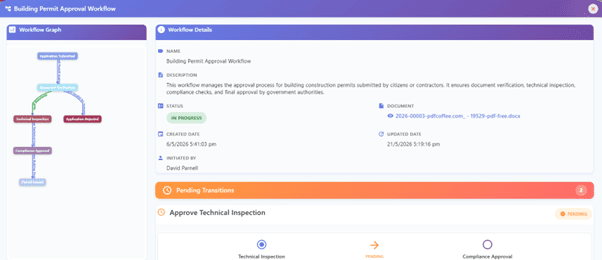
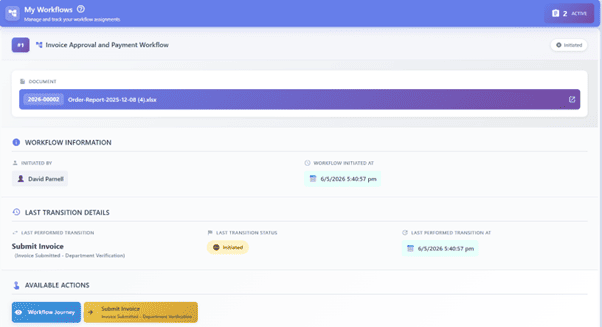
Complete Workflow Visibility
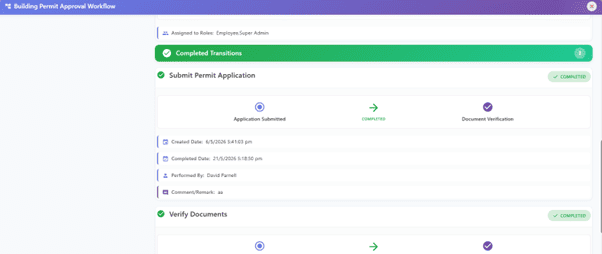
Throughout the workflow lifecycle, EasyDocMgt provides complete visibility.
Users can easily view:
Current workflow stage
Pending tasks
Assigned users
Workflow history
Status changes
Signatures
Document versions
Approval trail
Every action is recorded, creating a complete audit trail for compliance and accountability.
Benefits of EasyDocMgt Workflow Management
✔ Automate document approvals
✔ Reduce manual follow-ups
✔ Assign tasks to users or roles
✔ Automatic document status updates
✔ Configure reminders and notifications
✔ Require revised document versions
✔ Capture digital signatures
✔ Maintain complete audit history
✔ Improve compliance and governance
✔ Accelerate business processes
Frequently Asked Questions
What is workflow automation?
Workflow automation is the process of automatically routing documents through predefined review and approval stages.
Can workflows have multiple approval levels?
Yes. Workflows can include multiple review and approval stages involving different users, departments, or roles.
Can users receive automatic notifications?
Yes. The system automatically notifies users when action is required or when a document progresses to the next workflow stage.
How does workflow automation improve compliance?
Workflow automation creates consistent approval processes and maintains a complete audit trail of all workflow activities.
Can workflows be customized?
Yes. Organizations can create and modify workflows to match their specific business processes and requirements.
Can workflow automation be used for different departments?
Absolutely. Workflows can be configured for HR, Quality Management, Finance, Legal, Manufacturing, Healthcare, and many other business functions.
Conclusion
EasyDocMgt Workflow Management enables organizations to standardize, automate, and control document approval processes with ease. By combining configurable workflow steps, automated status updates, role-based approvals, reminders, document version control, and digital signatures, organizations can transform manual document handling into an efficient and compliant digital process.
Whether you are managing SOPs, contracts, quality documents, policies, engineering documents, or regulatory records, EasyDocMgt provides the flexibility and control needed to streamline document workflows across your organization.