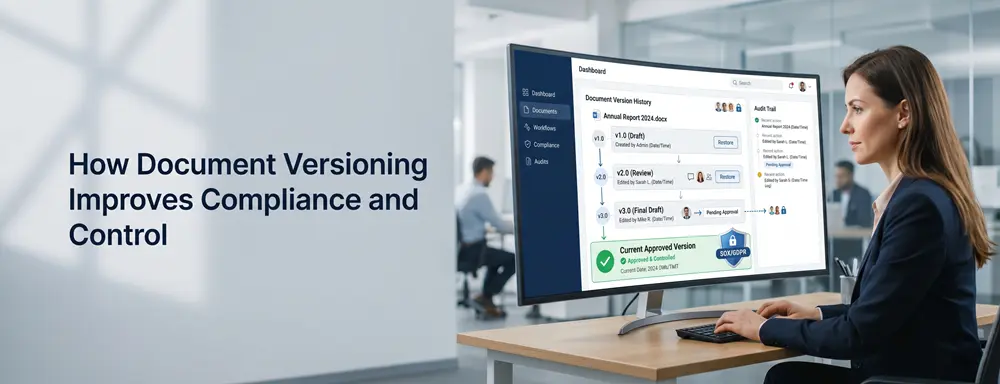
How Document Versioning Improves Control, Compliance, and Collaboration

ML GLOBTECH
Jun 7, 2026
What Is Document Versioning?
Document versioning is the process of managing and tracking changes made to a document over time.
Whenever a document is updated, the system automatically creates a new version while preserving previous revisions in the document history. This allows organizations to maintain a complete record of document changes and quickly restore earlier versions if needed.
For example:
Employee Handbook v1.0
Employee Handbook v1.1
Employee Handbook v2.0
Employee Handbook v3.0
Instead of replacing older files and losing valuable information, every version remains available for reference. This creates a clear audit trail and helps organizations maintain better control over important business documents.
Why Document Versioning Matters
Managing documents without version control can quickly become challenging, especially as organizations grow and more employees collaborate on the same files. Multiple copies of documents often end up being shared through emails, network drives, and shared folders, making it difficult to determine which version is the most current and accurate.
This can lead to employees working with outdated information, important changes being overwritten, and compliance risks during audits or regulatory reviews. For organizations managing policies, contracts, procedures, quality documents, and compliance records, maintaining document accuracy is critical.
Document versioning solves these challenges by tracking every document revision and ensuring users always have access to the latest approved version while preserving the complete history of previous versions.
How Document Versioning Works in Our Document Management System
Our Document Management System provides a simple and effective way to manage document revisions while maintaining complete version history.
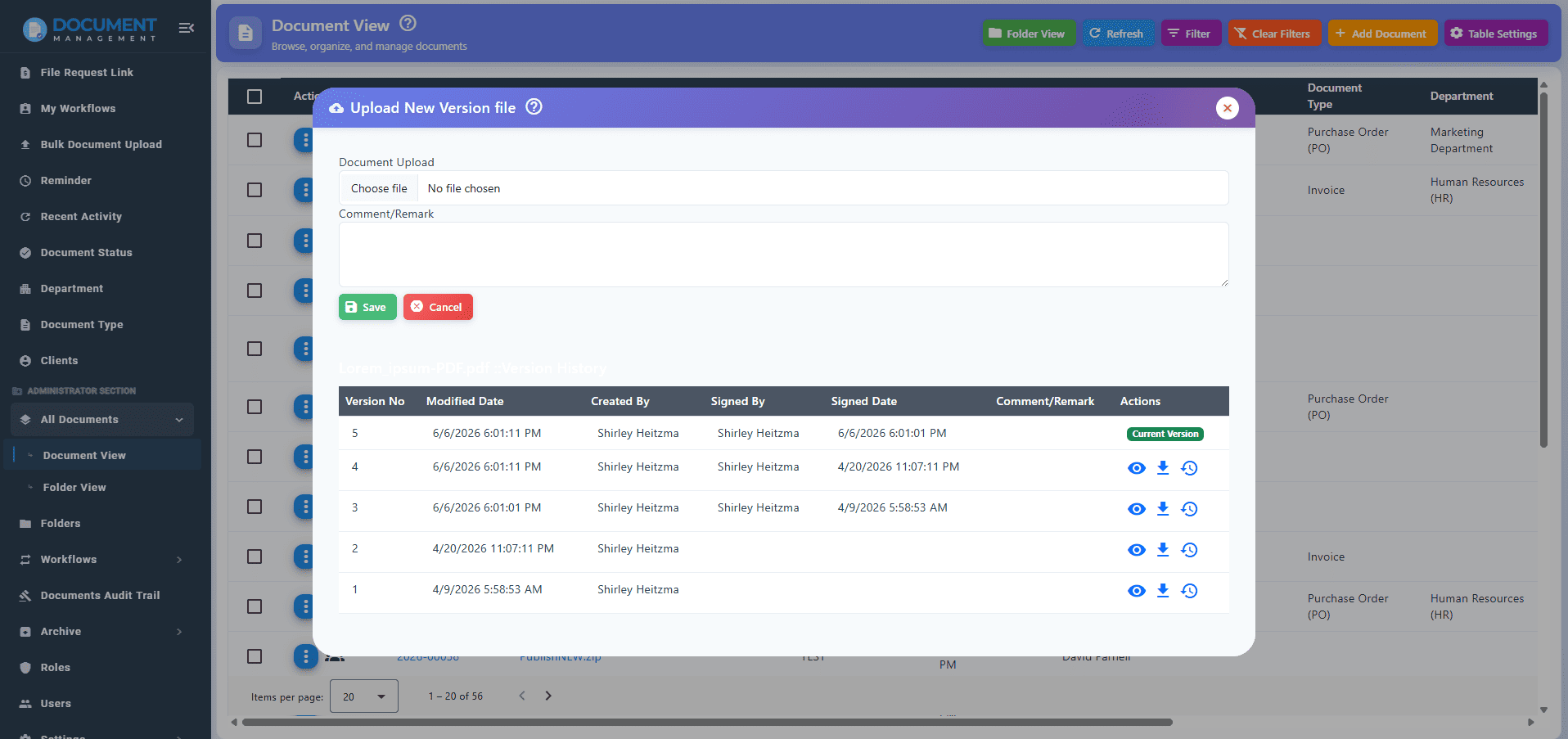
Uploading a New Version
When changes need to be made to an existing document, users can upload a new version directly from the document record.
The updated file automatically becomes the current active version while the previous version is moved into the document history.
This ensures users always access the latest version while preserving all historical revisions.
Viewing Previous Versions
The system maintains a complete history of document revisions.
Users can view and preview previous versions at any time, making it easy to review historical changes, compare revisions, and verify document updates before taking further action.
Restoring a Previous Version
If an earlier version needs to be reinstated, users can restore any previous version as the current active document.
When a previous version is restored:
The current document is automatically added to the document history.
The selected historical version becomes the active document.
All revision records remain intact.
Complete document traceability is preserved.
This allows organizations to recover from accidental changes while maintaining full version control.
How to Upload a New Version
Updating a document is straightforward:
Step 1: Navigate to the All Documents page.
Step 2: Select the document you want to update.
Step 3: Click the Upload New Version option.
Step 4: Select the updated file from your device.
Step 5: Click Save or Update.
The system automatically creates a new version entry, updates the version history, and makes the latest version available to authorized users.

Benefits of Document Versioning
Better Document Control
Maintain a complete history of document changes and ensure users always access the latest approved version.
Improved Collaboration
Allow multiple teams and departments to work confidently without worrying about outdated files or duplicate copies.
Compliance Support
Maintain document traceability and revision history to support quality management and regulatory requirements.
Audit Readiness
Provide auditors with a complete record of document changes, approvals, and revisions whenever required.
Reduced Risk of Errors
Prevent employees from using obsolete documents and reduce the likelihood of mistakes caused by outdated information.
Industry Use Cases
Quality Management Systems (QMS)
Manage SOPs, work instructions, CAPA records, audit documents, and quality manuals while maintaining complete revision history for ISO compliance.
Human Resources
Track updates to employee handbooks, company policies, onboarding documents, and training materials.
Healthcare
Maintain version control for patient procedures, compliance records, and operational guidelines.
Manufacturing
Control revisions for engineering drawings, work instructions, production documents, and quality records.
Legal
Track contract revisions, legal agreements, and policy documents while maintaining a complete audit trail.
Finance
Manage financial reports, tax documents, budgets, and audit records with full version visibility.
Frequently Asked Questions
What is document versioning?
Document versioning is the process of tracking and managing document revisions while preserving access to previous versions.
Why is document versioning important?
It helps organizations maintain document accuracy, improve collaboration, support compliance, and ensure users always work with the latest approved version.
Can I restore a previous version of a document?
Yes. Authorized users can restore any previous version while maintaining the complete document history.
How does document versioning support ISO 9001 compliance?
Version control provides document traceability, revision history, and document control processes that support ISO 9001 and other quality management standards.
Can users view previous document versions?
Yes. Users can view and preview historical versions directly from the document history.
What is the difference between document versioning and document backup?
Document versioning tracks changes made to individual documents over time, while backups are used for disaster recovery and restoring lost data.
Take Control of Document Revisions with ML GLOBTECH's DMS
ML GLOBTECH's Document Management System includes built-in document versioning capabilities designed to help organizations maintain complete control over document revisions.
With features such as automatic version history, document preview, version restoration, audit trails, OCR-powered search, workflow automation, and secure document storage, businesses can manage document changes more efficiently while improving compliance and collaboration.
Whether you're managing quality documents, contracts, policies, procedures, or compliance records, our solution provides the tools needed to maintain a single source of truth across your organization.
Conclusion
Document versioning is an essential part of effective document management. By maintaining a complete history of document changes and ensuring users always access the latest approved version, organizations can improve collaboration, strengthen compliance efforts, and reduce the risk of errors.
ML GLOBTECH's Document Management System helps organizations simplify document control through powerful version management, workflow automation, and secure document storage.
Learn more about our Document Management System and discover how it can help your organization manage documents more efficiently.