Sync Google Drive and Dropbox Documents with EasyDocMgt EDMS

ML GLOBTECH
Jun 9, 2026
Centralize Your Cloud Storage Documents in EasyDocMgt
Organizations often store business-critical documents across multiple cloud storage platforms such as Google Drive and Dropbox. While these services provide excellent file storage and collaboration capabilities, managing documents across different platforms can become challenging as the volume of data grows.
EasyDocMgt simplifies document management by allowing organizations to synchronize files and folders directly from Google Drive and Dropbox into a centralized document repository.
Why Managing Documents Across Multiple Cloud Platforms Becomes Difficult
Cloud storage platforms like Google Drive and Dropbox make it easy to store and share documents. However, as organizations grow, documents often become scattered across multiple accounts, folders, and teams.
This can make it difficult to locate the right files, maintain document control, and ensure everyone is working with the most up-to-date information. It can also create challenges for compliance, audits, and document governance.
By centralizing documents within an Enterprise Document Management System (EDMS), organizations can improve visibility, reduce duplication, and manage documents more efficiently from a single location.
Why Sync Google Drive and Dropbox with EasyDocMgt?
Many organizations face common challenges:
Documents scattered across multiple cloud accounts
Difficulty locating files quickly
Lack of centralized document control
Limited document approval workflows
Compliance and audit requirements
Duplicate files across platforms
By synchronizing cloud storage with EasyDocMgt, organizations gain a single source of truth for all their business documents.
Key Features
Download Complete Folder Structures
EasyDocMgt can connect to authorized Google Drive and Dropbox accounts and download:
Individual files
Entire folders
Nested subfolders
Shared documents
Large document libraries
The original folder hierarchy is preserved during synchronization, making it easy to maintain an organized document structure.
Support for Multiple File Types
The synchronization process supports a wide range of document formats, including:
PDF Documents
Microsoft Word Documents
Excel Spreadsheets
PowerPoint Presentations
Images
Text Files
CSV Files
Audio Files
Video Files
Automatic Metadata Extraction
During synchronization, EasyDocMgt can capture important file information such as:
File Name
File Size
Creation Date
Last Modified Date
Source Platform
Original Folder Path
This information helps improve document search and tracking capabilities.
Secure Authentication
EasyDocMgt uses OAuth-based authentication to securely connect to:
Google Drive Accounts
Dropbox Accounts
Users can authorize access without sharing their passwords with the application.
Centralized Search
Once synchronized, documents become searchable through EasyDocMgt's powerful search engine, allowing users to quickly find documents regardless of whether they originated from Google Drive or Dropbox.
How the Sync Process Works
Configure Google Drive or Dropbox OAuth credentials.
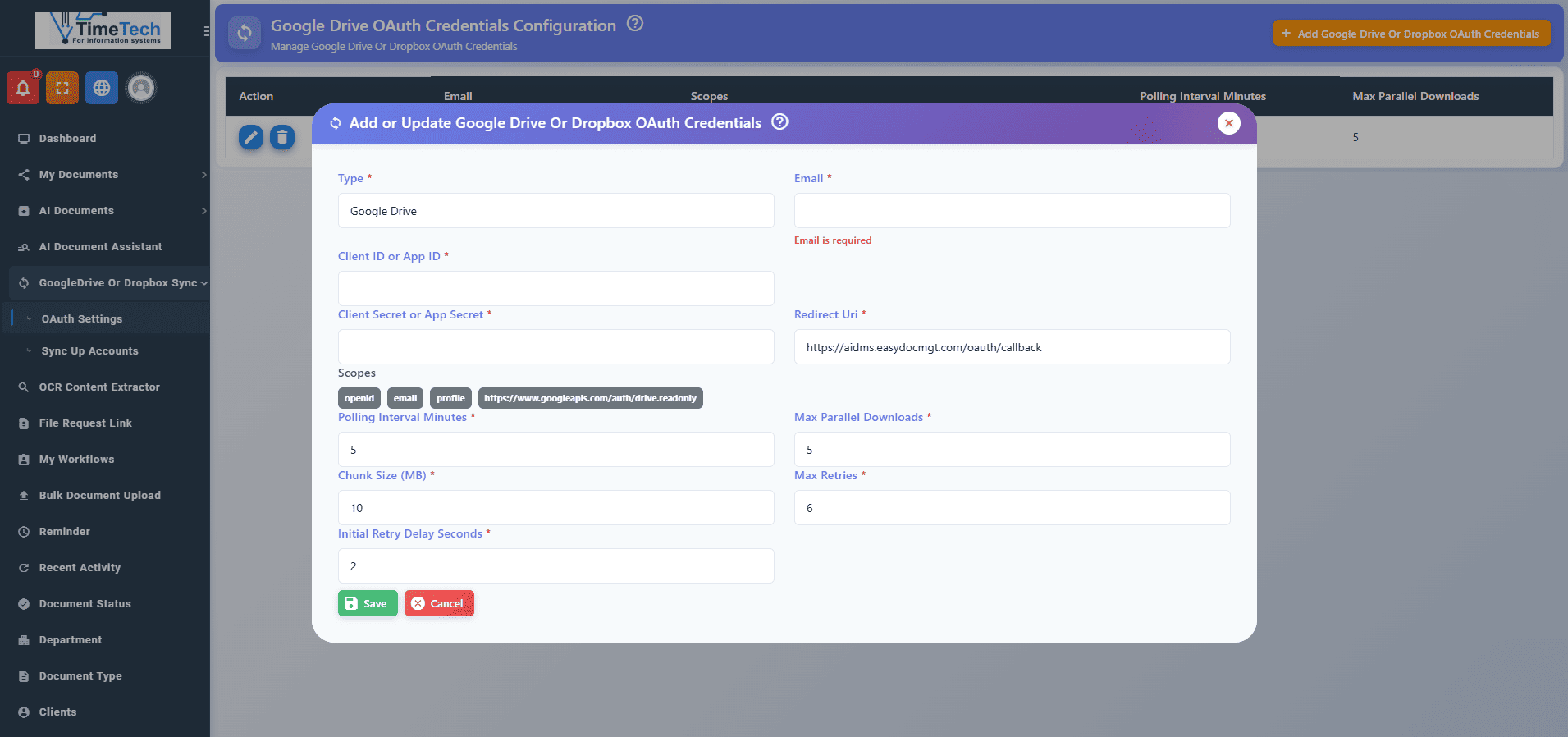
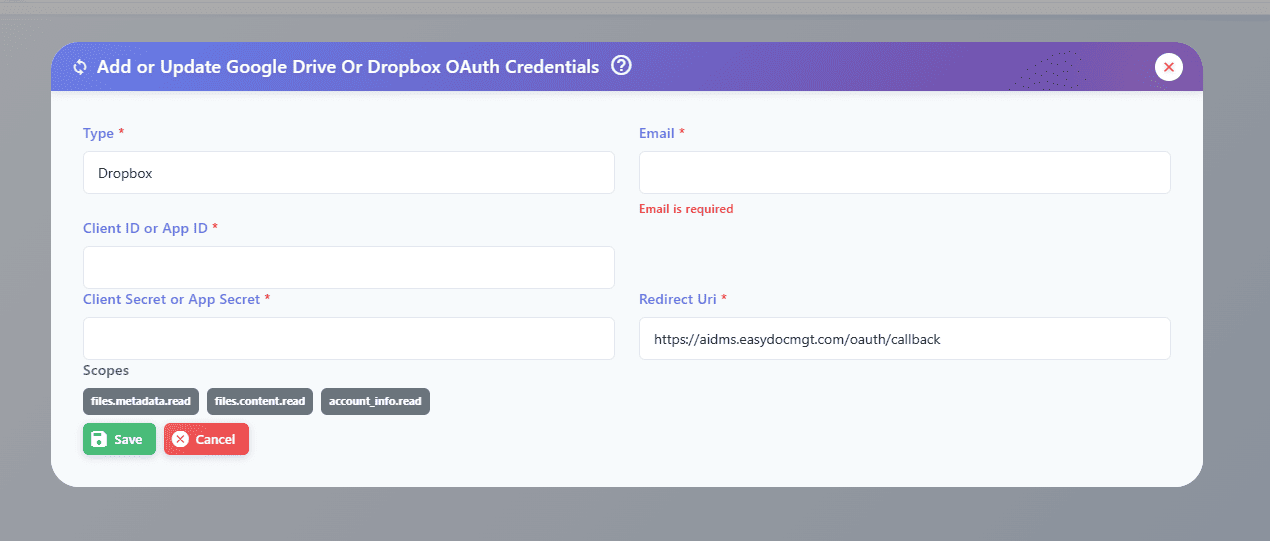
Connect and authorize the cloud storage account.
Select files or folders to synchronize.
EasyDocMgt downloads files and folder structures.
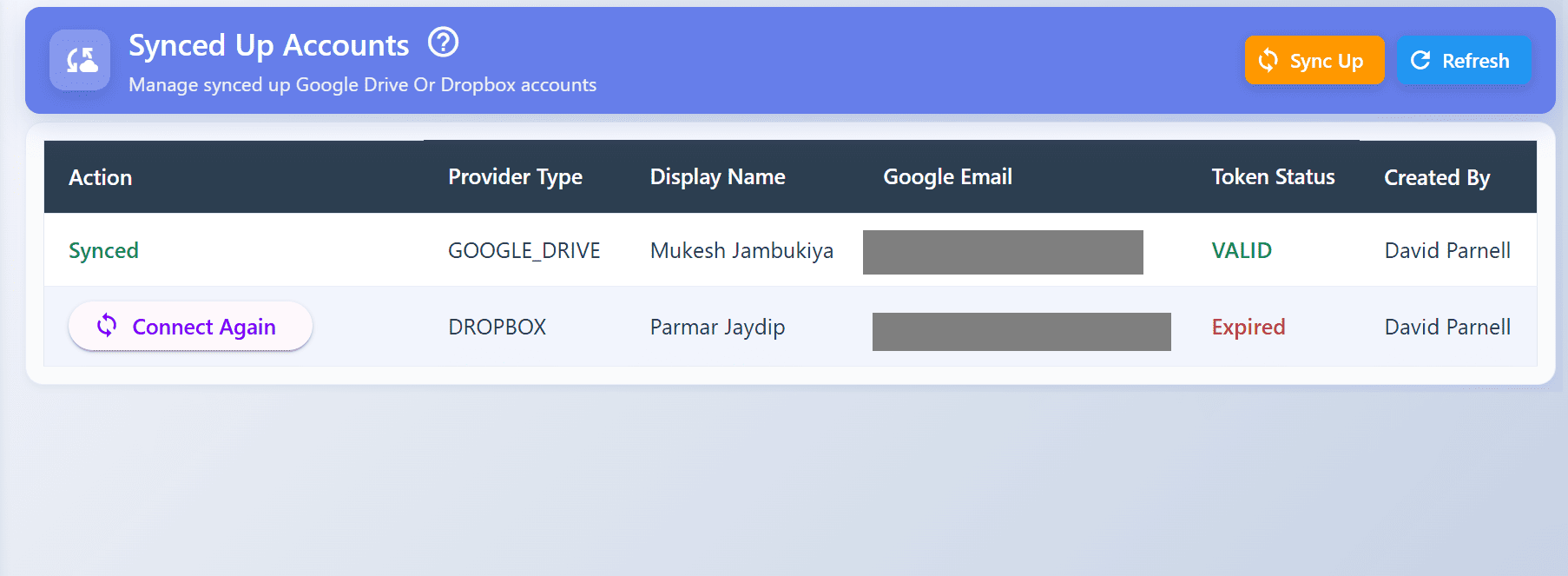
Documents are securely stored within the EDMS repository.
Users can search, view, share, and manage documents directly from EasyDocMgt.
Benefits of Synchronizing Cloud Storage with an EDMS
Improved Document Accessibility
Access documents from a single interface instead of switching between multiple cloud storage platforms.
Better Document Governance
Apply document policies, retention rules, approval workflows, and access controls after documents are imported into EasyDocMgt.
Enhanced Security
Store synchronized documents within your organization's controlled document management environment.
Faster Audits and Compliance
Maintain document histories and improve visibility into document storage locations for regulatory compliance.
Reduced Manual Effort
Eliminate the need for manually downloading and uploading files between systems.
Typical Use Cases
Department Document Migration
Import historical documents from Google Drive or Dropbox into EasyDocMgt for long-term management.
Centralized Knowledge Repository
Consolidate documents from multiple teams and departments into a single searchable repository.
Compliance and Records Management
Bring cloud-stored documents under organizational retention and approval policies.
Document Workflow Automation
Once synchronized, documents can participate in EasyDocMgt workflows such as:
Review and Approval
Document Control
Quality Management Processes
CAPA Workflows
Change Management Processes
What Happens After Documents Are Synchronized?
Once imported into EasyDocMgt, documents can benefit from:
Secure sharing
Audit trails
Frequently Asked Questions
Does folder structure remain intact?
Yes.
Which file types are supported?
It supports most of the file types available in market.
Is OAuth authentication secure?
Yes.
Can synchronized documents participate in workflows?
Yes.
Can documents be searched after synchronization?
Yes.
Transform Cloud Storage into a Complete EDMS
Google Drive and Dropbox are excellent storage solutions, but organizations often require advanced document management capabilities such as workflow automation, document control, version management, audit trails, and compliance tracking.
EasyDocMgt bridges this gap by synchronizing cloud-stored content into a powerful Enterprise Document Management System (EDMS), helping organizations improve efficiency, security, and governance while maintaining access to their existing cloud storage investments.
Start synchronizing your Google Drive and Dropbox documents today and experience centralized document management with EasyDocMgt.