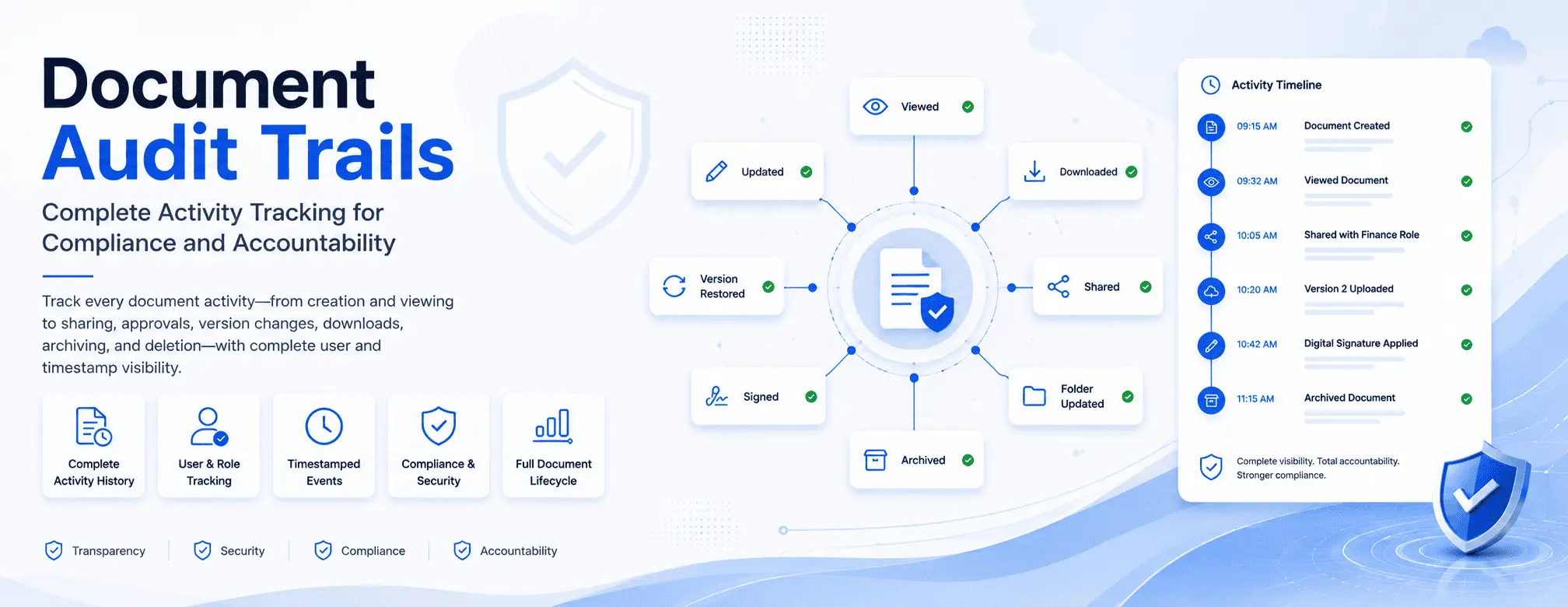
Document Audit Trails: Complete Activity Tracking for Compliance and Accountability

ML GLOBTECH
Jul 8, 2026
Every business document tells a story. From the moment a file is created until it is eventually archived or deleted, multiple users may view, edit, download, share, or approve it. Without a complete, tamper-proof record of these interactions, organizations rapidly lose visibility into who changed a document, when the change occurred, and why.
For businesses operating in regulated sectors, this lack of transparency is more than a simple operational headache—it is a severe compliance vulnerability. When an organization cannot answer basic questions about data access, it risks failing stringent regulatory audits for frameworks like ISO 27001, SOC 2, HIPAA, GDPR, and FDA 21 CFR Part 11.
This is where a robust Document Audit Trail becomes essential. By providing a chronological, automated history of every action performed on a file throughout its lifecycle, an audit trail strengthens security, enforces accountability, and transforms compliance from a reactive scramble into a seamless, continuous process.
Why Traditional File Storage Fails the Audit Test
Most organizations do not experience critical failures simply because a document goes missing. Disasters typically occur because leadership cannot definitively answer questions such as:
Who modified this contract last?
Is this the most recently approved version of the standard operating procedure (SOP)?
Which external users downloaded this highly confidential financial report?
Who authorized the removal of access permissions for a specific team?
Relying on shared network drives, consumer-grade cloud links, or email chains makes investigating data leaks or resolving document disputes nearly impossible. A comprehensive Enterprise Document Management System (EDMS) eliminates these blind spots by continuously running a background audit log.
What Is a Document Audit Trail?
A Document Audit Trail is an automated, chronological log of every significant event related to a document or workspace. Instead of merely acting as a digital filing cabinet, an intelligent system actively records the specific action that occurred, the identity of the user who performed it, the exact timestamp, and the specific file or folder affected.
This creates an immutable history that proves to internal stakeholders and external auditors that your data is secure, controlled, and actively monitored.
What Should a Modern Document Audit Trail Track?
A powerful audit trail must capture the entire lifecycle of a document, extending far beyond simple edits. To maintain true enterprise security and E-E-A-T (Expertise, Experience, Authoritativeness, and Trustworthiness) in your data governance, ensure your system monitors the following activities:
📄 Document Creation and Uploads
Every document begins with an initial upload or creation event. Recording this establishes the beginning of the file's lifecycle and provides a definitive record of its origin. Knowing exactly when a document entered the system and who introduced it is the first step in establishing an accurate chain of custody.
👁️ Document Views and Read History
Accessing confidential information can be just as sensitive as modifying it. Whether dealing with an employee handbook, a legal agreement, or an engineering schematic, organizations require visibility into exactly who viewed a file. Tracking read history helps monitor unauthorized internal browsing and provides documented proof that critical compliance materials were actually reviewed by the necessary personnel.
✏️ Version Changes and Modifications
Business documents evolve naturally. Corporate policies are updated, vendor contracts are renegotiated, and product specifications are refined. Tracking these modifications helps teams identify unauthorized changes, maintain historical records, and ensure that employees are strictly operating off the most current, approved version of a file.
📥 File Downloads
Downloading a document creates a localized copy outside of the secure organizational environment. For intellectual property or regulated data, administrators must know exactly who extracted a copy and when. Tracking download history is critical for identifying potential data exfiltration and enforcing strict information security protocols.
🔄 Version Restoration
Mistakes happen, and documents sometimes need to be rolled back to a previous iteration after an incorrect update. A secure system must not only allow for version restoration but also log the exact user who executed the rollback, ensuring complete traceability even when correcting errors.
🔗 Sharing and Distribution History
Collaboration drives business, but sharing files introduces inherent risks if unmonitored. An enterprise system must record every instance of a document or folder being shared, detailing who initiated the share, who the recipient was (whether internal roles or external guests), and the exact time access was granted.
👥 Permission and Access Changes
Managing who has the right to view or edit a document is paramount. When an employee changes departments or leaves the company, their access must be revoked. An audit trail tracks exactly who granted or removed user and role-based permissions, creating a historical record that proves your access controls are actively managed.
✍️ Digital Signatures and Approvals
Many business-critical files require formal sign-off. Recording the digital signature activity—capturing who signed, when they signed, and the exact version of the document they approved—adds an indisputable layer of accountability required for regulatory audits.
🗄️ Archiving and Deletion
When a document reaches the end of its active lifecycle, it is either archived for historical compliance or permanently deleted. Tracking these end-of-life events protects the organization against accidental data loss and provides administrators with a clear timeline of when and why permanent changes to the database occurred.
Best Practices for Document Governance
To maximize the security and compliance value of your audit trails, implement the following standard operating procedures:
Enforce Universal Tracking: Ensure audit logging is enabled globally for all sensitive repositories, preventing users from bypassing the system.
Audit Permissions Routinely: Regularly review access logs and permission changes to ensure they align with current staffing and project requirements.
Prioritize Archiving Over Deletion: Whenever possible, archive inactive records rather than deleting them to preserve historical evidence for future audits.
Monitor Download Activity: Set up alerts or routinely check the download history on highly classified folders to detect anomalous behavior early.
Leverage Role-Based Access: Combine audit trails with strict role-based access controls to limit exposure from the start.
Frequently Asked Questions
What is a document audit trail?
It is a chronological, automated history of every significant action performed on a file, including creation, viewing, editing, sharing, downloading, approvals, and deletion.
Why are audit trails required for compliance?
Frameworks like ISO 9001 and FDA Part 11 require organizations to prove that their documentation is controlled, secure, and traceable. Audit logs provide the objective evidence auditors need to verify these controls are functioning.
Can administrators track file downloads?
Yes. In a secure enterprise environment, every time a user downloads a localized copy of a file, the action is permanently stamped in the audit log.
Does an audit trail track folder-level changes?
A comprehensive system tracks activity at both the individual file level and the broader workspace or folder level, ensuring structural changes to your repository are also monitored.
Final Thoughts
A Document Audit Trail is the foundation of secure, compliant data management. By automatically tracking every file event from creation to final deletion, organizations eliminate operational blind spots and ensure they are always ready for regulatory audits.
Stop relying on manual tracking to protect your most valuable information. Explore our Enterprise Document Management System to automate your compliance and secure your business data today.